
More from the app, paid once.
Ray Kiln Pro adds tools to the Ray Kiln app for Mac and to the playground in your browser, and a little to your account here. It costs US$10, once. No subscription: nothing renews and nothing more is charged.
US$10 once, plus any sales tax or VAT for your country
One moment…
Sign in to buy Pro belongs to an account: sign in, or make one with your email address.
For . Paddle’s checkout opens over this page.
Pro isn’t on sale yet.
Checkout isn’t available right now. Try again later.
Pro is on your account; restart nothing, the app picks it up when you open its Account window.
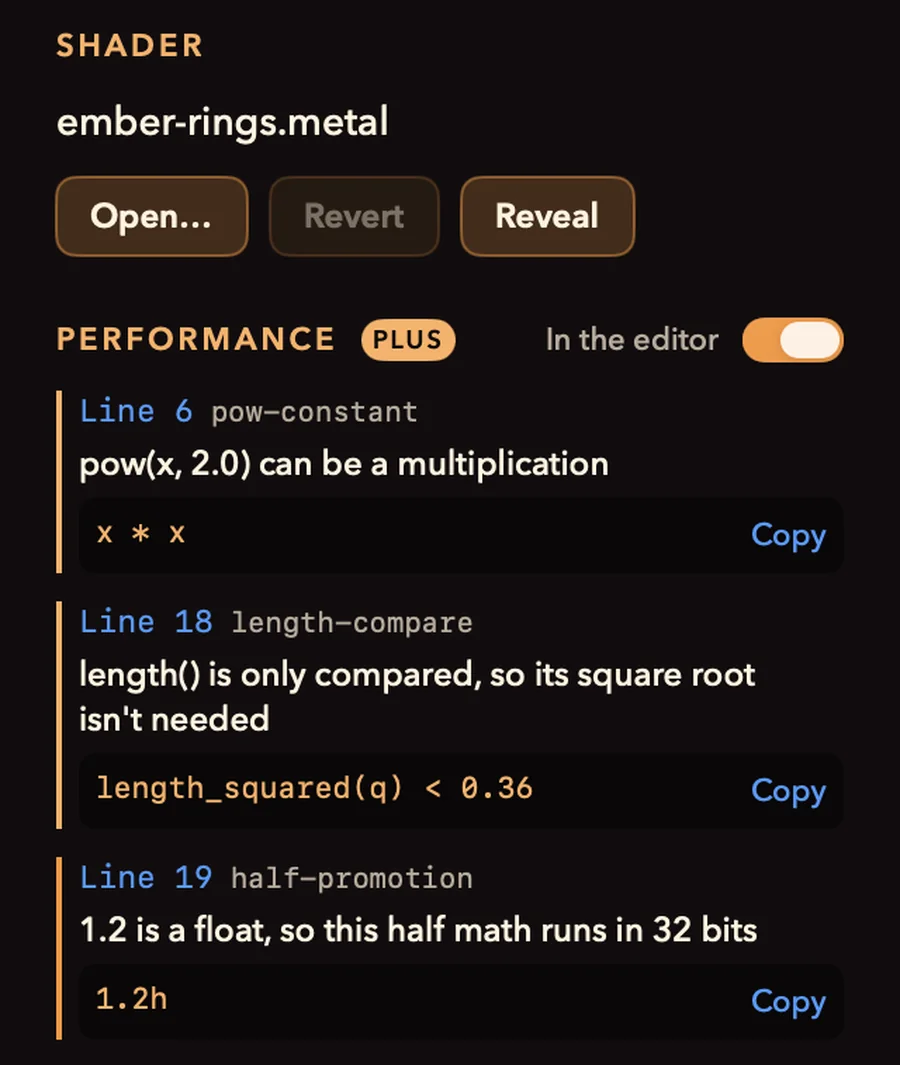
Performance hints in the editor
The shader linter runs every time your shader compiles, in the Mac app and in the playground in your browser. Each line that costs time on Apple GPUs is marked where you are working, with the change that fixes it, and the hint goes the moment the fix lands. In the playground, the GPU time readout then says what the edit did: faster, slower or the same, with a chart of your recent edits.
- Half math that a float literal quietly turns into 32-bit math
- pow and length where a multiply or a squared length will do
- Dependent texture reads, discards, integer division: 12 rules in all, the same as the free linter
- In the app, listed beside the shader too; ⌥⌘L hides them
GPU frame analysis
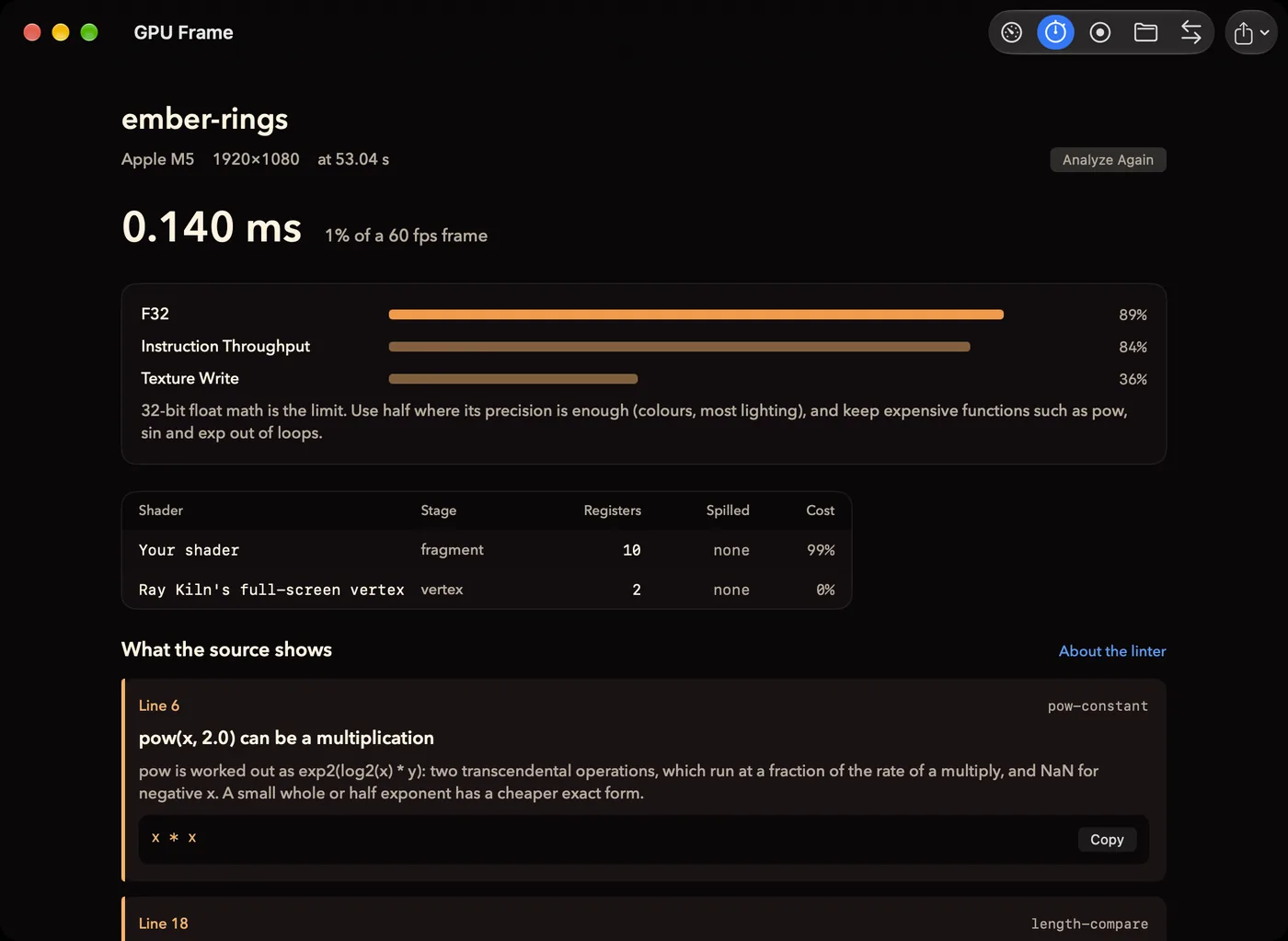
One frame of your shader, rendered and read with Apple’s own tools: its GPU time, what limits it and its registers, with the linter’s findings beside them, so the number comes with the line to change. Analyze again after a fix to see what it saved.
- The limiter, in words you can act on
- Registers and spills for every shader in the frame
- What changed since the last analysis, and the two captures side by side
- A frame of your own Metal app (a development build) checked for loads, stores and passes it doesn’t need
Times and registers need an M3 or later.
And everything else in Pro
ProRes, transparent video and seamless loops
Export ProRes, and HEVC with transparency for compositing; loops that end exactly where they start.
Live wallpaper and a screen saver
Any shader running as your desktop wallpaper, or as your Mac’s screen saver.
Sound and controllers
Shaders that react to the microphone, and sliders moved from a MIDI controller, in the app and the playground, or over OSC in the app.
Keyframes
Parameters that change over time, keyed at moments and exported with the video, in the app and the playground.
Your own inputs
Images, video and the webcam, in the app and the playground; and in the app, the previous frame for feedback effects (free in the playground).
Performance mode
Shaders full screen from a set list, switched by key or MIDI with a fade, in the browser.
Copy as SwiftUI
A shader as a SwiftUI view to paste into your app, or a small package ready for Xcode.
SwiftUI effects for Xcode
A SwiftUI effect made in the playground or the app as a Swift package with a #Preview; and in the app, SwiftUI’s own picture of it beside Ray Kiln’s, as you type (with Xcode installed). About SwiftUI shader effects.
Snapshots
Versions of your shader kept as you work, to look back at or go back to: in the app, and for your drafts in the playground.
What each edit costs, in the browser
The playground’s GPU time readout says what your last edit did to it, 25% faster or 10% slower, with a chart of your recent edits; on any computer whose browser times the GPU.
Shadertoy and GLSL in, web pages out
In the app: File > Import GLSL or Shadertoy turns a Shadertoy or GLSL shader into a Ray Kiln shader, and File > Export Web Page saves any fragment shader as one HTML file that runs it with WebGPU. On the site, the GLSL to Metal tool does the import in the browser.
More from the free tools
From the Metal to WebGPU converter, a web page that runs your shader on its own with WebGPU, sliders and all, to open anywhere or put on your site; from the noise explorer, the noise as a seamless, tiling PNG up to 4096 × 4096, for games, 3D and backgrounds.
GLSL to Metal
A Shadertoy or GLSL shader as Metal that opens in the playground and runs in the app: mainImage, iTime, matrices and out parameters converted, and anything that doesn’t convert named on its line. Try it.
A Pro badge
Beside your handle on the gallery, your page and the shaders you share.
Longer loops, more shares
Gallery loops up to 16 seconds, made by the app or the playground, and 60 shares a day instead of 20.
Everything that is free today stays free: the episodes, accounts, favourites, sharing, forks, collections, wallpapers, embeds, the new-episode emails, and every export preset already in the app, 4K included.
Free and Pro
| Free | Pro | |
|---|---|---|
| The episodes, their videos, source and sound | Yes | Yes |
| An account, favourites, collections, new-episode emails | Yes | Yes |
| The app: editor, sliders, presets, stills | Yes | Yes |
| Video export, up to 4K, and the social clips | Yes | Yes |
| Forks, embeds, wallpapers to download | Yes | Yes |
| Sharing shaders to the gallery | 20 a day, 8-second loops | 60 a day, loops up to 16 seconds |
| ProRes, HEVC with transparency, seamless loops | No | Yes |
| Live wallpaper and screen saver | No | Yes |
| Microphone, MIDI and OSC | No | Yes |
| Keyframes | No | Yes |
| Images, video, webcam and feedback inputs | No | Yes |
| Performance mode in the browser | No | Yes |
| Copy as SwiftUI | No | Yes |
| SwiftUI effects: running them, in the app and the playground | Yes | Yes |
| SwiftUI effects for Xcode, and SwiftUI’s own preview in the app | No | Yes |
| Snapshots (version history) | No | Yes |
| The shader linter, in the browser | Yes | Yes |
| Performance hints in the editor, as you type (app and playground) | Counted | Yes |
| GPU time a frame, in the playground | Yes | Yes |
| What each edit did to that time, with a chart | No | Yes |
| GPU frame analysis (macOS 27) | No | Yes |
| The free tools: linter, converter, graph, palette, noise | Yes | Yes |
| A shader as a web page of its own; tiling noise textures | No | Yes |
| Import GLSL and Shadertoy in the app; export a web page | No | Yes |
| GLSL and Shadertoy to Metal, in the browser | A preview | Yes |
| A Pro badge beside your handle | No | Yes |
Questions
- Is it a subscription?
- No. You pay US$10 once. Pro covers the Pro features added in later versions too, for as long as Ray Kiln runs.
- Does it work offline?
- Pro needs you signed in to your account in the app, in its Account window, which takes a connection. After that, the Pro features work without one.
- Is it for one account?
- Yes. Pro belongs to the Ray Kiln account that bought it, on every Mac where you sign in to that account.
- Is Pro on Windows, Linux, iPhone or iPad?
- The Ray Kiln app is for the Mac (macOS 15 or later), and so are its Pro tools. In the playground, which runs in any browser with WebGPU, on Windows and Linux too, Pro adds performance hints, keyframes, your own inputs, MIDI, performance mode and snapshots of your drafts, and, where the browser times the GPU, what each edit costs.
- Can I get a refund?
- Yes, within 30 days. See the refund policy.
- Who sells it?
- Paddle.com, our reseller and merchant of record, handles the payment, the receipt and any sales tax or VAT. Ray Kiln never sees your card details. Receipts are on your account page once you have bought it.
Paddle.com, our reseller and merchant of record, takes the payment and handles tax; Ray Kiln never sees your card. This page, on its own address, is the only one that loads Paddle’s checkout; the pages where you are signed in never do. Buying Pro means you accept the terms; the privacy page says what is kept about a purchase. Questions: support@pablin.me.